

티스토리 뷰
안녕하세요. 이번 글에서는 Spring Batch 에서 파티셔닝(Partitioning)을 사용한 실무 사례들을 소개해보겠습니다. 대용량 데이터를 효율적으로 처리하기 위한 파티셔닝의 개념부터 실제 구현 사례까지 단계별로 설명드리겠습니다.
소개 & 배경
Spring Batch는 대용량 데이터를 안정적으로 처리하기 위한 배치 프레임워크입니다. 하지만 처리 대상 데이터의 규모가 커질수록 단일 스레드 기반 처리에는 한계가 발생합니다. 이러한 문제를 해결하기 위한 대표적인 방법 중 하나가 파티셔닝(Partitioning) 입니다.
파티셔닝은 전체 데이터를 여러 개의 작은 작업 단위로 나누어 병렬로 처리함으로써, 처리 시간을 단축하고 시스템 자원을 보다 효율적으로 활용할 수 있도록 도와줍니다. 이번 글에서는 Spring Batch 5 환경에서 파티셔닝을 실제 실무에서 어떻게 활용할 수 있는지, 여러 사례를 통해 정리해 보겠습니다.
Spring Batch 파티셔닝 개념
Spring Batch에서 파티셔닝은 Partitioner 인터페이스를 통해 구현됩니다.
Partitioner 인터페이스는 다음과 같이 정의되어 있습니다:
public interface Partitioner {
    Map<String, ExecutionContext> partition(int gridSize);
}
Partitioner는 전체 작업을 여러 개의 파티션으로 분할하고, 각 ExecutionContext를 워커 스텝에 전달하는 역할을 수행합니다.
핵심 포인트는 다음과 같습니다.
- 전체 데이터의 범위를 계산합니다.
- 병렬 처리 개수(grid size)에 따라 파티션을 분할합니다.
- 각 파티션에 필요한 최소한의 정보만 ExecutionContext에 담아 전달합니다.
이 구조를 잘 설계하면, 데이터 소스(DB, 외부 API 등)에 따라 유연한 병렬 처리가 가능합니다.
파티셔닝 공통 처리 흐름
실무에서 파티셔닝을 적용할 때 공통적으로 사용되는 흐름은 다음과 같습니다.
- 전체 데이터 개수를 조회합니다.
- grid size를 기준으로 파티션 크기를 계산합니다.
- 반복문을 통해 파티션별 시작/종료 범위를 계산합니다.
- 각 범위를 ExecutionContext에 저장합니다.
- 워커 스텝에서는 전달받은 컨텍스트를 기준으로 데이터를 처리합니다.
이 패턴을 기반으로 다양한 데이터 소스에 맞는 파티셔닝 전략을 구현할 수 있습니다.
병렬 처리와 확장성의 중요성
대용량 데이터 처리에서 병렬 처리와 확장성이 중요한 이유는 다음과 같습니다:
처리 시간 단축: 단일 스레드로 처리하면 1시간이 걸리는 작업을 10개의 파티션으로 나누면 이론적으로 6분으로 단축할 수 있습니다. 실제로는 오버헤드가 있지만, 여전히 상당한 성능 향상을 기대할 수 있습니다.
리소스 활용 최적화: 멀티코어 CPU 환경에서 여러 파티션을 동시에 처리하면 CPU 자원을 효율적으로 활용할 수 있습니다.
확장성: 각 파티션을 다른 서버나 워커에서 실행할 수 있어, 필요에 따라 처리 능력을 확장할 수 있습니다.
장애 격리: 한 파티션에서 오류가 발생해도 다른 파티션은 계속 처리할 수 있어 전체 작업의 안정성이 향상됩니다.
실무 사례별 파티셔닝 설명
실무에서는 데이터 소스나 처리 방식에 따라 다양한 파티셔닝 전략을 사용합니다. 각 사례별로 활용 상세를 소개해보겠습니다.
외부 API 호출 기반 파티셔닝
외부 API에서 데이터를 가져와 처리하는 경우에는, 이를 위한 전용 Item Reader가 없기 때문에 AbstractPagingItemReader를 상속하여 구현한 Custom PagingItemReader를 사용해 API 응답결과를 페이지네이션 하고 해당하는 스텝의 파티션을 나눌 수 있습니다.
처리 흐름:
- 외부 API를 호출하여 전체 데이터 개수를 조회합니다.
- 페이지 크기와 파티션 개수를 기반으로 각 파티션의 범위를 계산합니다.
- 각 파티션은 할당된 범위의 데이터를 API로부터 가져와 처리합니다.
읽은 데이터 Chunk(Page)를 파티셔닝하기 위한 Partitioner 구현체를 직접 작성해야 합니다.
@Slf4j
@AllArgsConstructor
public class ReleasedProductApiResponseListPartitioner implements Partitioner {
    private final InvoicePartitioningJobParameter parameter;
    private final NanSoftApiService nanSoftApiService; // Http Client를 사용해
    // 3PL (WMS) 출고 상품 목록 조회 API를 호출하는 서비스 클래스.
    protected int gridSize;
    protected Boolean isValidTrackingNumber;
    protected String beanName;
    @Override
    public Map<String, ExecutionContext> partition(int gridSize) {
        List<ReleasedProductApiResponse> all =
            nanSoftApiService.getReleasedProductsForThreeDays(parameter.getReleaseDate());
        // ... 파티셔닝 로직
    }
}
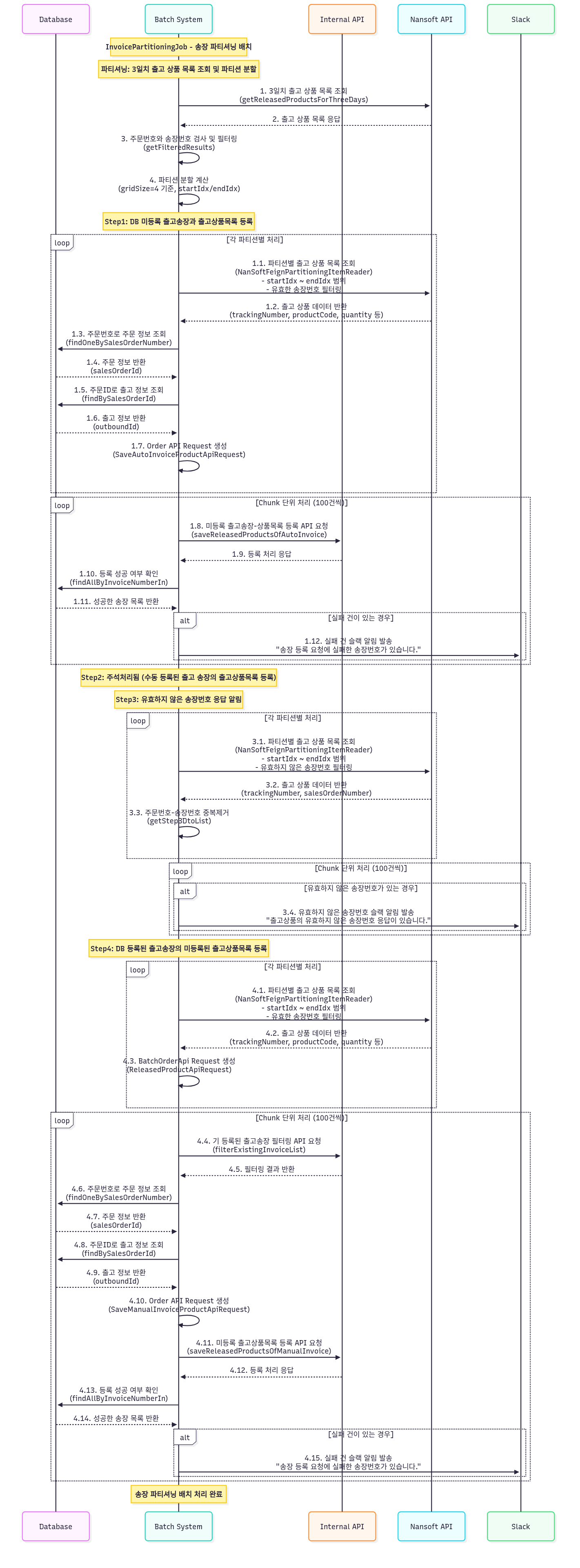
다음은 제가 실무에서 구현한 출고 송장과 출고 송장 상품 등록 병렬처리 배치 잡의 다이어그램입니다. AbstractPagingItemReader 를 상속한 NanSoftFeignPartitioningItemReader를 구현하여 API 응답결과를 페이지네이션하고, idx 설정하여 각 페이지 내 파티션 범위를 계산할 수 있도록 했습니다.
QueryDSL 기반 파티셔닝
데이터베이스에서 대량의 데이터를 조회하여 처리하는 경우, QueryDSL을 사용하여 ID 범위로 파티션을 나눌 수 있습니다.
처리 흐름:
- 데이터베이스에서 처리할 데이터의 최소 ID와 최대 ID를 조회합니다.
- 파티션 개수를 기반으로 ID 범위를 계산합니다.
- 각 파티션은 할당된 ID 범위의 데이터를 조회하여 처리합니다.
/**
 * QueryDSL No-Offset 페이징을 위한 전용 파티셔너
 *
 * @param <T> 엔티티 타입
 * @param <ID> ID 타입
 */
@Slf4j
@RequiredArgsConstructor
public class QuerydslNoOffsetPartitioner<T, ID> implements Partitioner {
    protected final EntityManagerFactory entityManagerFactory;
    protected final int gridSize; // 파티션 크기
    protected final String CriteriaFieldName; // 정렬기준 필드명
    protected final Function<JPAQueryFactory, JPAQuery<T>> queryFunction;
    protected final String beanName;
    protected Map<String, Object> jpaPropertyMap = new HashMap<>();
    protected EntityManager entityManager;
    protected volatile List<T> results;
    protected Long totalSize; // 읽기 대상 아이템 총 크기
    @Override
    public Map<String, ExecutionContext> partition(int gridSize) {
        String threadName = Thread.currentThread().getName();
        EntityTransaction tx = getTx();
        // ... 파티셔닝 로직
    }
}
다음은 실무에서 구현한 출고지시 병렬처리 잡의 다이어그램입니다. NoOffsetPagingItemReader를 사용하고 TSID 체번의 ID값을 기준으로 페이지당 파티션 범위를 계산하도록 Partitioner 적용했습니다.

MyBatis 기반의 세밀한 파티셔닝
MyBatis를 사용하는 경우, ROW_NUMBER(), DENSE_RANK()와 같은 DB 함수를 사용해 보다 세밀한 파티션 제어가 가능합니다. 예를 들어, ROW_NUMBER()으로 페이지당 파티션 범위를 계산하도록 Partitioner를 작성하되, 특정 컬럼값을 기준으로 파티셔닝되면 안되는 경우, DENS_RANK() 값을 사용해 제한하도록 구현할 수 있습니다.
처리 흐름:
- 데이터베이스에서 처리할 데이터의 총 개수나 범위를 조회합니다.
- 파티션 개수를 기반으로 각 파티션의 처리 범위를 계산합니다.
- 각 파티션은 MyBatis 매퍼에 파티션 정보를 전달하여 해당 범위의 데이터를 조회합니다.
이래는 실무에서 사용한 파티셔너 구현체입니다. 전체 데이터 수를 조회하는 쿼리와 파티션 범위의 데이터를 조회하는 쿼리를 사용합니다.
@Slf4j
@RequiredArgsConstructor
public class MyBatisItemReaderKeyColumnRNPartitioner implements Partitioner {
    protected final Map<String, Object> parameterValues;
    protected final SqlSessionFactory sqlSessionFactory;
    protected final int gridSize;
    protected final String statement;
    protected final String rangeStatement;
    protected final String beanName;
    protected Long totalSize;
    public static final String PARTITION_NUMBER = "partitionNumber";
    public static final String START_RN = "startRN";
    public static final String END_RN = "endRN";
    public static final String START_KEY_COL_DR = "startKeyColDR";
    public static final String END_KEY_COL_DR = "endKeyColDR";
    public static final String PARTITION_PREFIX = "Key-Column-Partition-";
    @Override
    public Map<String, ExecutionContext> partition(int gridSize) {
        String threadName = Thread.currentThread().getName();
        log.info("[{}] [{}] Starting partitioning with gridSize: {}", threadName, beanName, gridSize);
        try (SqlSession sqlSession = sqlSessionFactory.openSession()) {
            totalSize = sqlSession.selectOne(statement, parameterValues);
        } catch (Exception e) {
            log.warn("[{}] [{}] Exception Message: {}", threadName, beanName, e.getMessage());
            totalSize = 0L;
        }
        if (totalSize == 0L) {
            return createFallbackPartition();
        }
        try {
            List<PartitioningDto.KeyColumnRange> partitionRanges = executePartitionQuery();
            return createPartitions(partitionRanges, threadName);
        } catch (Exception e) {
            log.error("[{}] [{}] Exception during partitioning: {}", threadName, beanName, e.getMessage());
            return createFallbackPartition();
        }
    }
}
다음과 같이 모든 데이터의 개수를 조회하는 쿼리가 필요합니다.
<select id="countAllMainInvoices" parameterType="hashmap">
<![CDATA[
SELECT COUNT(*)
FROM (
    SELECT
        ROW_NUMBER() OVER (ORDER BY obi.invoice_number, obip.product_code) RN,
        DENSE_RANK() OVER (ORDER BY obi.invoice_number) AS invoice_DR,
        MAX(so.sales_order_number) AS sales_order_number,
        MAX(so.sales_order_id) AS sales_order_id,
        MAX(so.user_id) AS user_id,
        MAX(ob.outbound_number) AS outbound_number,
        'CJ' AS shipping_company_type,
        obi.invoice_number,
        obip.product_code,
        obip.product_name,
        obip.quantity
    FROM `order`.`outbound` ob
    INNER JOIN `order`.`sales_order` so ON ob.sales_order_id = so.sales_order_id
    INNER JOIN `order`.`outbound_invoice` obi ON ob.outbound_id = obi.outbound_id
    INNER JOIN (
        SELECT outbound_id, MIN(register_invoice_datetime) register_invoice_datetime
        FROM `order`.`outbound_invoice`
        WHERE invoice_number REGEXP '^[0-9]+$' AND delete_yn = 'N'
        GROUP BY outbound_id
    ) AS main_obi ON obi.register_invoice_datetime = main_obi.register_invoice_datetime
    INNER JOIN `order`.`outbound_invoice_product` obip ON obi.outbound_invoice_id = obip.outbound_invoice_id
    WHERE ob.delete_yn = 'N'
        AND so.delete_yn = 'N'
        AND so.outbound_yn = 'Y'
        AND so.sales_order_type NOT IN ('BAG_ORDER', 'GUEST_ORDER')
        AND obi.delete_yn = 'N'
        AND obip.delete_yn = 'N'
        AND obip.is_main_invoice_yn = 'Y'
        AND obi.register_invoice_datetime BETWEEN #{startDateTime} AND #{endDateTime}
) TB
]]>
</select>
각 파티션 범위의 데이터를 조회하는 쿼리가 필요합니다.
<select id="getKeyColumnRange" parameterType="hashmap" resultMap="KeyColumnRangeMap">
<![CDATA[
WITH ranked_data AS (
    SELECT
        ROW_NUMBER() OVER (ORDER BY obi.invoice_number, obip.product_code) AS RN,
        DENSE_RANK() OVER (ORDER BY obi.invoice_number) AS invoice_DR,
        obi.invoice_number,
        obip.product_code,
        obip.product_name,
        obip.quantity
    FROM `order`.`outbound` ob
    INNER JOIN `order`.`sales_order` so ON ob.sales_order_id = so.sales_order_id
    INNER JOIN `order`.`outbound_invoice` obi ON ob.outbound_id = obi.outbound_id
    INNER JOIN (
        SELECT outbound_id, MIN(register_invoice_datetime) register_invoice_datetime
        FROM `order`.`outbound_invoice`
        WHERE invoice_number REGEXP '^[0-9]+$' AND delete_yn = 'N'
        GROUP BY outbound_id
    ) AS main_obi ON obi.register_invoice_datetime = main_obi.register_invoice_datetime
    INNER JOIN `order`.`outbound_invoice_product` obip ON obi.outbound_invoice_id = obip.outbound_invoice_id
    WHERE ob.delete_yn = 'N'
        AND so.delete_yn = 'N'
        AND so.outbound_yn = 'Y'
        AND so.sales_order_type NOT IN ('BAG_ORDER', 'GUEST_ORDER')
        AND obi.delete_yn = 'N'
        AND obip.delete_yn = 'N'
        AND obip.is_main_invoice_yn = 'Y'
        AND ((ob.outbound_status = 'IN_TRANSIT' AND obip.in_transit_notif_yn = 'N')
            OR (ob.outbound_status = 'DELIVERED' AND obip.delivered_notif_yn = 'N'))
        AND obi.register_invoice_datetime BETWEEN #{startDateTime} AND #{endDateTime}
    GROUP BY obi.invoice_number, obi.register_invoice_datetime, obip.product_code, obip.product_name, obip.quantity
    ORDER BY 1
) TB,
partition_boundaries AS (
    SELECT
        invoice_DR,
        MIN(RN) AS start_RN,
        MAX(RN) AS end_RN,
        NTILE(#{gridSize}) OVER (ORDER BY invoice_DR) AS partition_number
    FROM ranked_data
    GROUP BY invoice_DR
)
SELECT
    partition_number,
    MIN(start_RN) AS start_RN,
    MAX(end_RN) AS end_RN,
    MIN(invoice_DR) AS start_key_col_DR,
    MAX(invoice_DR) AS end_key_col_DR
FROM partition_boundaries
GROUP BY partition_number
ORDER BY partition_number
]]>
</select>
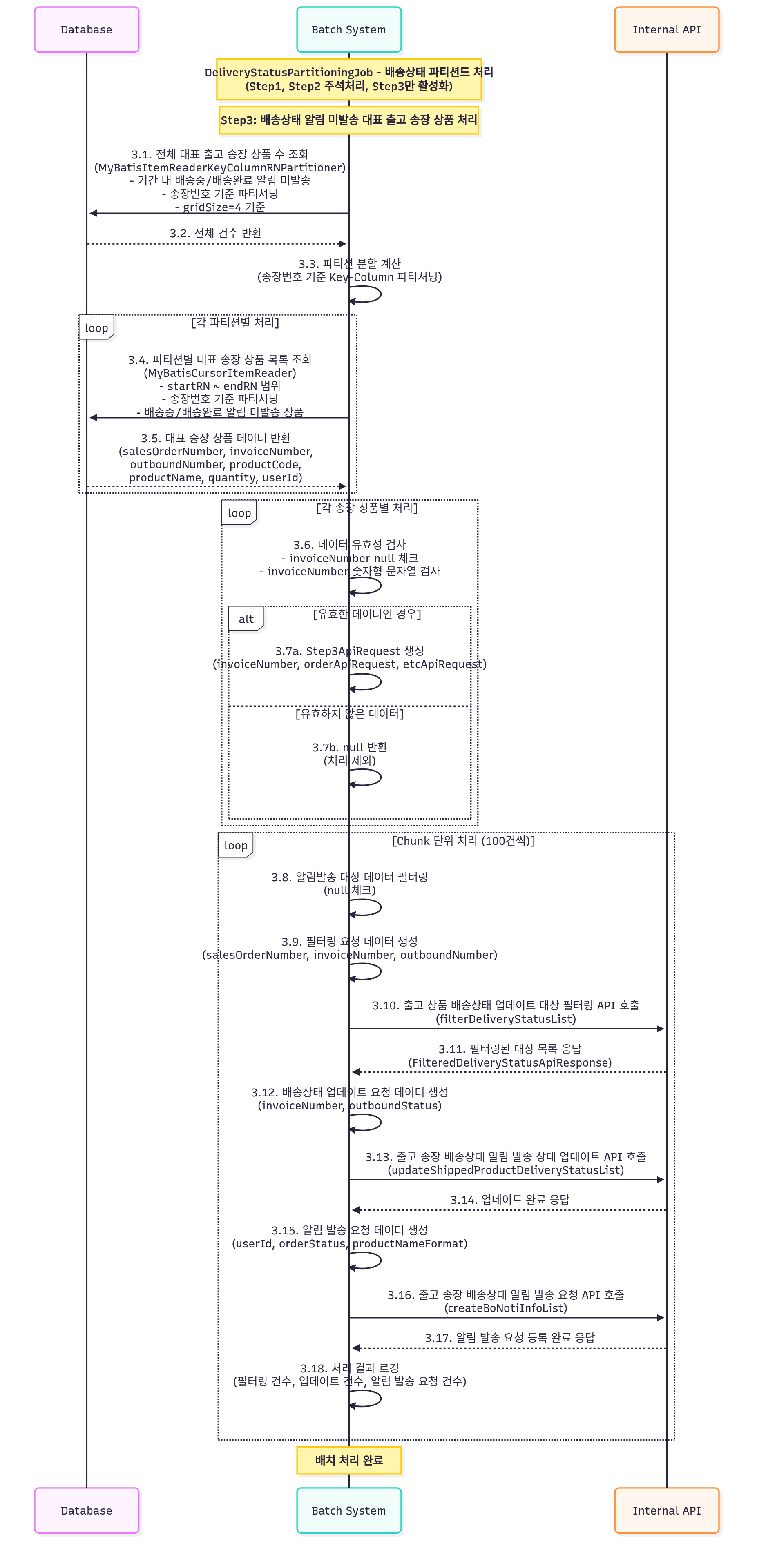
이상과 같이 파티셔닝하여 실무에서 사용한 배송상태 알림발송 병렬처리 배치잡의 다이어그램입니다. 출고송장마다 N개의 출고송장상품 데이터가 조회되므로, 출고송장번호 DENSE_RANK()를 사용해 파티션의 첫번째 출고송장의 출고송장상품부터 마지막 출고송장의 마지막 출고송장상품까지를 정확한 파티션 범위를 갖도록 했습니다.
맺음말 & 실무적 의미
이번 글에서는 Spring Batch의 파티셔닝 기능을 실무에서 활용하는 방법을 살펴보았습니다. 대용량 데이터를 효율적으로 처리하기 위해 데이터를 여러 파티션으로 나누어 병렬 처리하는 방법과, 외부 API, QueryDSL, MyBatis 등 다양한 데이터 소스에 맞는 구현 방식을 소개했습니다.
파티셔닝은 단순히 병렬 처리를 적용하는 기술이 아니라, 데이터 특성과 시스템 환경을 고려한 설계가 핵심입니다. 적절한 분할 기준과 공통 처리 흐름을 잘 정의해 두면, 외부 API, QueryDSL, MyBatis 등 다양한 환경에서도 일관된 배치 구조를 유지할 수 있습니다. 실무에서 파티셔닝을 적용할 때는 데이터 특성, 시스템 리소스, 비즈니스 요구사항을 종합적으로 고려해야 합니다. 파티션 크기와 개수를 적절히 조정하고, 모니터링과 에러 처리 전략을 수립하여 안정적인 운영을 보장해야 합니다.
파티셔닝을 활용하면 대용량 데이터 처리 작업의 성능을 크게 향상시킬 수 있습니다. 특히 배치 작업의 실행 시간을 단축하여 운영 효율성을 높일 수 있습니다. Java 21 부터는 가상스레드를 지원하는 파티셔너를 사용하면 더 큰 효과를 기대할 수 있을 것입니다. 파티셔닝은 Spring Batch의 강력한 기능 중 하나입니다. 대용량 데이터 처리 작업에서 성능과 확장성 문제를 해결하는 데 큰 도움이 될 것입니다.
'WORK-RELATED' 카테고리의 다른 글
| [JAVA] JVM 리소스 로깅 유틸리티 클래스 구현 및 활용 (0) | 2025.12.26 |
|---|---|
| [Spring Batch] 스프링배치 멀티스레딩 환경에서 스레드 안정성 (1) | 2025.12.09 |
| [Spring Boot] 트랜잭션 부분 롤백 구현과 실무 사례 (0) | 2025.04.01 |
| [Spring Batch] 배치 잡의 Step 사이에 변수 공유 (0) | 2025.04.01 |
| [Spring Batch 5] API 호출 Item Reader 커스텀과 csv 데이터 생성 (0) | 2025.03.28 |
- Total
- Today
- Yesterday
- mybatis
- Redis vs DB
- DB 인덱스 성능
- Redis 성능 개선
- InterruptedException
- Enum 기반 싱글톤
- Spring Batch
- Initialization-on-Demand Holder Idiom
- 캐시 성능 비교
- 캐시와 인덱스
- DB 트랜잭션
- Cache Aside
- 트랜잭션 관리
- 백엔드 성능
- Cache Avalanche
- Cache Penetration
- Eager Initialization
- 동시성처리
- 스레드 생명주기
- 백엔드 아키텍처
- Java Performance
- Redis 캐시 전략
- Double-Checked Locking
- 트래픽 처리
- Hot Key 문제
- 캐시 장애
- spring batch 5
- 백엔드 성능 튜닝
- TTL 설계
- 백엔드 성능 설계
| 일 | 월 | 화 | 수 | 목 | 금 | 토 |
|---|---|---|---|---|---|---|
| 1 | 2 | 3 | 4 | |||
| 5 | 6 | 7 | 8 | 9 | 10 | 11 |
| 12 | 13 | 14 | 15 | 16 | 17 | 18 |
| 19 | 20 | 21 | 22 | 23 | 24 | 25 |
| 26 | 27 | 28 | 29 | 30 | 31 |